You can spend $1,500 on a guest post, land a DR80 mention, and still get zero SEO value if Google never indexes the page it lives on. Most link builders only discover this after the damage is done.
We’ve built over 5,000 links across client campaigns. On average, only 50% confirm indexed within 30 days. This means that for every two links you build, one may not be delivering anything yet. The fix depends entirely on why.
In 2026, the pipeline is the same, but the failure modes are better documented, and so are the fixes. Firstly, determine if it should be indexed at all. Then, remove any barriers preventing Googlebot from crawling it; if possible, ask for crawling via Google Search Console; give it a gentle push from well-indexed locations, and get rid of useless links.
This guide covers why backlinks go unrecognized, what prevents Googlebot from crawling and indexing them, and how to fix these issues. You’ll learn how backlink indexing works in 2026, the common causes of indexing failures, and how to prioritize, strengthen, and manage backlinks for better SEO results.
What Does It Mean for a Backlink to Be Indexed?
The phrase “indexed backlink” gets used loosely. A link passes through several distinct stages before it can move rankings, and indexing is only one of them. Treating them as a single event is the most expensive mistake in link building.

Backlink Discovery
Discovery happens when Googlebot finds the URL of the page containing your backlink. The bot might reach it through a sitemap submission, an internal link, an external link, or an RSS feed. At this stage, Google only knows the URL exists. Nothing has been read, evaluated, or stored.
Ex. The SaaS marketing blog where your guest post lives publishes twice a week and maintains an active sitemap; Googlebot visits it on a reasonable schedule.
Swap that for a niche blog that hasn’t published in four months, and the same post might sit unnoticed for weeks. Discovery speed is a function of how much Google already values the host, not how good the content is.
Backlink Indexing
Indexing happens when Google decides the linking page is worth storing in its searchable index. The page must pass content evaluation and quality assessment before it earns a slot.
Google states plainly that not every crawled page gets indexed, because each one is assessed for value before storage. A page can be crawled dozens of times and still never be indexed.
A 2025 analysis of more than 16 million pages by IndexCheckr found that 61.94% of pages in the dataset were never indexed at all. Among those that did get indexed, only 14% made it into Google’s index within the first week, and the average page took 27.4 days.
Backlink Recognition
Recognition is the moment Google’s ranking systems process the link inside that indexed page and pass authority signals to your site. This is the only stage that actually moves rankings. An indexed linking page does not automatically mean the outbound link gets weighted into your profile.
The J.C. Penney link scheme exposed by The New York Times in February 2011 made this distinction painfully clear. Thousands of pages were indexed and stuffed with descriptive anchor text. Google still demoted J.C. Penney from the top spot to position #71 for queries like “Samsonite carry on luggage” because the links were not credited the way the link builder intended.
The scale is different for a single SaaS guest post, but the failure mode is identical. If the anchor text is over-optimized for a commercial keyword, or if the blog’s outbound link pattern looks built rather than editorial, Google can index the page and still choose to discount your link entirely.
Why These Are Not the Same Thing
Each transition has a different failure mode, and most SEOs collapse them by mistake. Keeping them separate prevents wasted effort.
- An indexed page does not equal a counted link. Google can index a page and still discount or ignore the outbound links on it, especially if the page looks manipulative.
- A discovered link does not equal an indexed page. Discovery is cheap. Indexing is selective.
- An indexed backlink does not equal ranking impact. Recognition is a separate step that depends on link quality, anchor text, context, and trust.
Here is the simple flow worth memorizing:

If you try to push a link forward without knowing which stage is failing, you will spend money on the wrong fix.
Why Backlink Indexing Matters
The reason indexation matters is not the index itself. It is what an indexed page enables downstream.
Allows Link Equity to Be Evaluated
A page Google has never indexed cannot pass authority signals you can rely on. Indexation is the gatekeeper for any link equity calculation. Without it, the link is technically invisible to ranking systems.
Helps Validate Link Building Investments
If you paid for outreach, sponsored content, or digital PR, you need proof that the placement reached Google.
With digital PR budgets typically running $5,000 to $25,000 per month and individual tier-one placements costing well over $1,000, indexation is the cleanest measurable signal that your money produced something Google can see and process.
Without that signal, you cannot defend the spend to a client or a CFO.
Improves Referral Visibility
An indexed page is also a discoverable page. People searching for related queries may land on the linking article, click the link, and become referral traffic. Unindexed pages cannot deliver that traffic stream.
Confirms Google Has Processed The Linking Page
Indexation tells you the page passed Google’s quality threshold for storage. That is a meaningful confidence signal about the linking site, even before you consider ranking impact.
How Search Engines Discover Backlinks
Understanding the pipeline is what makes the process useful. Indexing is not a single event. It is a sequence, and each phase has its own constraints.
Phase 1: Discovery (Crawling)
Googlebot finds new URLs through links from already-indexed pages, XML sitemaps, and direct submissions.
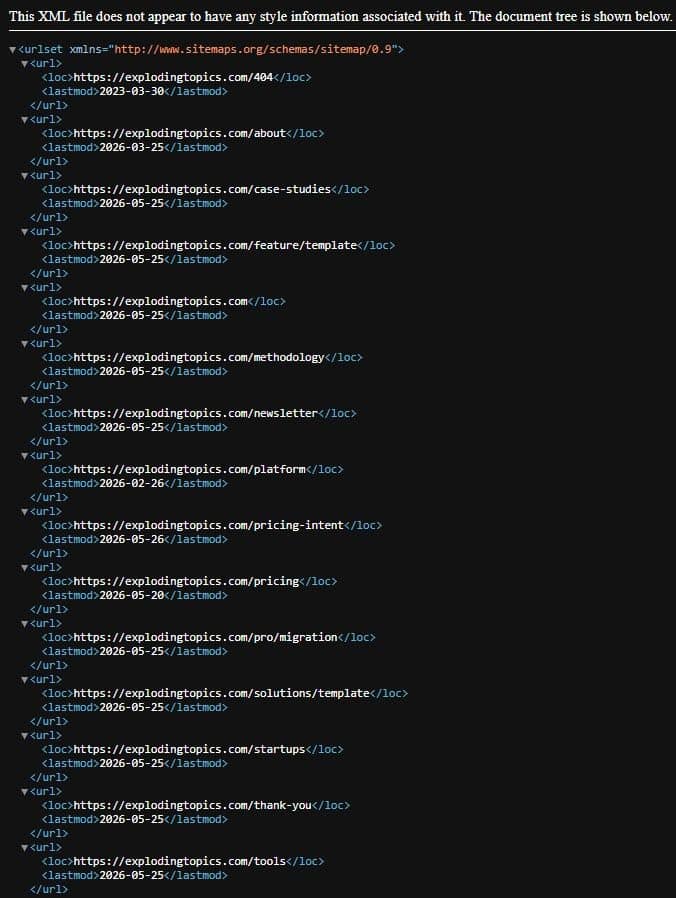
A well-maintained sitemap that exposes lastmod timestamps gives Google clear freshness signals and improves crawl scheduling.
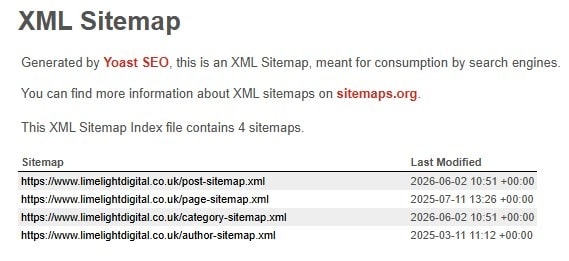
Pages with strong inbound discovery paths get crawled quickly. Pages buried deep in a site or absent from sitemaps can wait weeks.
Phase 2: Evaluation
After crawling, Google weighs uniqueness, structure, user value, spam signals, and technical directives like canonical tags or robots.txt. Many pages are filtered out here and never reach the index.
Phase 3: Indexing
Pages that pass evaluation are stored, and this is the quiet failure point for most backlinks.
When you own the host, Search Console labels the gap precisely:
“Discovered, currently not indexed” means Google knows the URL but has not crawled it, while “Crawled, currently not indexed” means it crawled the page and chose not to store it.
The first is a crawl problem. The second is a quality problem, and the fixes are different.
Phase 4: Link Processing
Once a page is in the index, Google processes the links inside it. Anchor text, link position, surrounding text, and trust signals from the host all factor in.
SpamBrain, Google’s AI-based spam detection system publicly named in 2022, neutralizes manipulative link patterns at this stage and has been expanded through multiple updates since. Recognition can lag indexation by days or weeks, especially when SpamBrain needs additional signals to evaluate intent.
Before You Try to Index a Backlink: Is It Worth Indexing?
Before doing anything, confirm you’re solving the right problem. Most indexing failures fall into one of five patterns, and the triage below matches each one to its actual fix.
Run this check first:
1. Check Whether The Linking Page Is Already Indexed
Use a quick site:URL search before doing anything else. If the page already appears, you do not have an indexing problem. You have a recognition or measurement problem.
For example, running the site:https://linkbuild.agency/digital-pr-statistics/ tells you in seconds whether Google has stored that exact page or not.
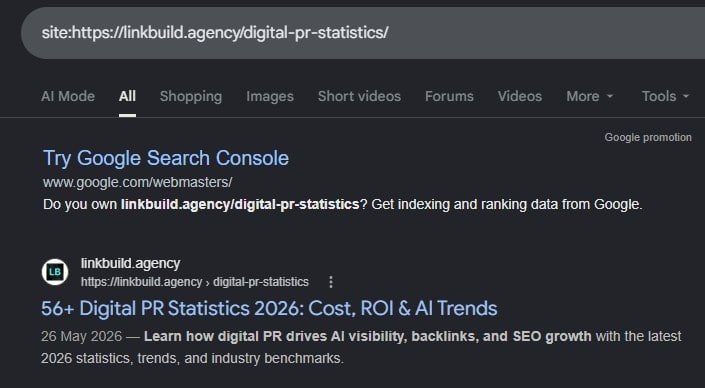
If the page already appears, you do not have an indexing problem. You have a recognition or measurement problem.
2. Assess The Quality Of The Linking Page
Look at the content, the topical fit, and whether the page exists to help real readers. If it reads like a thin template designed to host links, indexing will not save it.
3. Verify The Site Receives Regular Crawling
Use a backlink tool to see when a major crawler last saw the host page. Crawl demand reflects a site’s popularity, freshness, and perceived value, so a site Google visits often will index quality pages on its own without your help.
A 2025 study of 1.4 million monitored pages by Indexing Insight found that a page not crawled in the last 130 days has a 99% chance of remaining not indexed. The longer the gap, the worse the odds.
4. Confirm The Link Is Crawlable
Check that the link is not wrapped in JavaScript that Googlebot cannot render, hidden behind a login, or pointed at a redirect chain. Crawlability problems often masquerade as indexing problems.
5. Evaluate Potential SEO Value
Ask whether the link is on a topically relevant page with reasonable authority. If the linking domain has no organic traffic and weak topical signals, the link has a limited ceiling even if indexed.
6. When It’s Better To Ignore The Link
Some links should never reach the index. Examples include thin content pages with no unique value, obvious private blog network footprints, unmoderated spam directories, and low-quality AI-generated pages with no editorial oversight.
The 2022 link spam update fully deindexed some PBN networks, both the money sites and the network sites. That’s a meaningful benchmark for how Google treats this pattern.
Why Backlinks Fail To Get Indexed
Each failure pattern has a recognizable shape. Identifying it correctly determines whether you can fix it or should walk away.
The Linking Page Is Not Being Crawled
Googlebot has never reached the URL.
Symptoms: No crawl date visible in backlink tools, no site:URL match, no log entries from Googlebot.
Quick fix: Email the SaaS blog’s editor and ask them to add an internal link from their content hub, category archive, or related-posts widget. One link from a page Google visits regularly moves the needle faster than any third-party tool.
If you can’t reach the editor yet, sharing the URL on LinkedIn from your own profile gives Googlebot a fresh, crawlable path within hours, not because of social signals, but because LinkedIn posts are crawled almost immediately.
The Page Has Thin Or Low-Quality Content
The page was crawled but failed Google’s content evaluation.
Symptoms: Search Console shows “Crawled, currently not indexed” for similar pages on the host.
Quick fix: You cannot fix this from the outside. The publisher would need to substantially improve the page.
The Site Sends Spam Signals
The hosting domain has spammy patterns that Google has learned to filter.
Symptoms: Very few pages from the domain are indexed despite many being crawled.
Quick fix: Disengage. A link in a manipulative neighborhood is not worth recovering.
Imagine the SaaS guest post was placed on a site where most articles exist only to host backlinks. Even if Google discovers and crawls the page, the domain’s overall quality signals may prevent the link from delivering meaningful SEO value. In these situations, recovery efforts are rarely worth the time.
The Page Is Orphaned
No internal links on the host site point to the page, so Google rarely revisits it.
Symptoms: Sporadic crawl history and weak refresh signals.
Quick fix: Ask the publisher to add the page to a category, archive, or sidebar. Even a single internal link can change crawl frequency.
Technical Barriers Prevent Indexing
Server-side directives are blocking the bot or the page itself.
Symptoms: URL Inspection in Search Console returns errors.
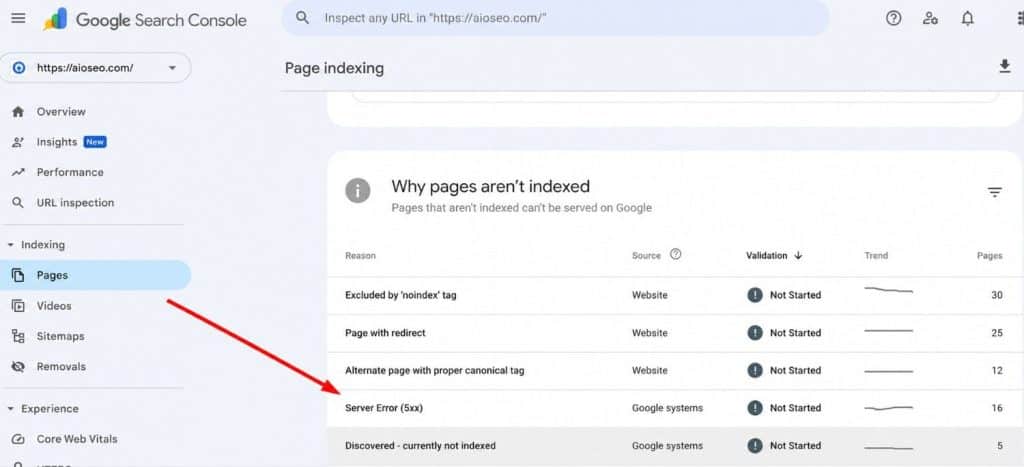
Examples include robots.txt blocks, noindex meta tags, 5xx server errors, and broken canonical tags pointing to other pages.
Quick fix: Share the diagnostic with the publisher. Most of these are honest mistakes that they can fix.
The Site Has Low Crawl Demand
Google’s crawl budget combines crawl capacity and crawl demand, and low-popularity sites simply get less attention. Gary Illyes has confirmed that URLs more popular on the internet are crawled more often to keep them fresher.
Crawl demand reflects how often Google wants to revisit a site based on popularity, freshness, and user value.
Symptoms: Slow indexing across the entire host, not just one page.
Quick fix: Build external signals around the host. A surge of legitimate attention often raises crawl demand.
How To Index Backlinks Faster
In our campaigns, the 50% that don’t index within 30 days rarely share the same root cause. Some were never crawled. Some were crawled and rejected. Some had a noindex tag that the publisher didn’t know about. That’s why a checklist doesn’t work here; the right fix depends on which stage failed.
Most guides give you a checklist. This one gives you a decision tree, because the fix for a never-crawled page is completely different from the fix for a content-rejected page. Applying the wrong fix wastes time and occasionally makes things worse.
Start Here: The Three-Question Diagnosis
Answer these in order. Stop when you have your answer.
Q1: Is the page already indexed?
Run site:https://exactpageurl.com in Google. If it shows up, you do not have an indexing problem. You have a recognition or measurement problem, track ranking changes and stop here.
Q2: Has the page ever been crawled?
Pull the URL into any backlink tool that shows crawl history. Look for a “last crawled” date.
- No crawl date → Discovery failure. Google has never reached this URL. Go to Track A.
- Crawl date exists, not indexed → Evaluation failure. Google found the page and rejected it. Go to Track B.
Q3 (Track B only): Are there technical blockers?
Check for noindex meta tags, robots.txt disallows, broken canonical tags pointing elsewhere, and 5xx server errors on recrawl. If any are present, contact the publisher; it’s almost certainly an accident.
Track A: Discovery Failure (Never Crawled)
Back to the SaaS guest post. Ten days live, no crawl date in Ahrefs, nothing from the site: check. That’s a discovery failure. Here’s how to work through it.
This is a plumbing problem. You need to route the URL into Googlebot’s existing path.
Day 0–1: Email the publisher asking them to add an internal link from their category page, recent posts widget, or sidebar. Frame it as a routine connectivity check, not a complaint.
One internal link from a crawled page is the single highest-leverage move available; a page reachable from three internal links on a regularly crawled site rarely has persistent discovery problems.
If you don’t want to contact the publisher yet, share the URL on LinkedIn from your account or the publisher’s. LinkedIn posts are crawled within hours in most cases. This isn’t about social signals; it’s about giving Googlebot a fresh, crawlable path to the URL.
Day 7 checkpoint: Rerun the crawl date check in your backlink tool. If a date now appears, wait up to two more weeks for indexing evaluation. If still no date, escalate.
Day 7–14 escalation:
- Post the URL in a topically relevant Reddit thread where it genuinely fits. Active subreddits are crawled multiple times per day.
- Cite the page in a Medium or Substack post on a related topic. Both platforms are crawled aggressively.
- If the host runs RSS, ask the publisher to include the URL in a fresh post. Google processes RSS frequently for domains it already trusts.
Day 14 decision point: If Google hasn’t crawled the page in 14 days despite fresh external references pointing to it, the host domain likely has low crawl demand overall. Evaluate whether continuing is worth it. A domain Google visits only once a month rarely provides reliable link value, even after eventual indexing.
Track B: Evaluation Failure (Crawled, Not Indexed)
Different version of the same scenario: your SaaS post now has a crawl date from last Tuesday, but it’s still not indexed. Google found it, evaluated it, and chose not to store it. That’s an evaluation failure, and the approach is completely different.
This is harder, and usually not something you can fix from the outside.
Immediate: If you have Search Console access to the site, run URL Inspection. The label tells you exactly what you’re dealing with:
- “Discovered, currently not indexed” → Crawl hasn’t happened yet. Scheduling issue, not a quality rejection. Use the “Request Indexing” button and wait up to 72 hours.
- “Crawled, currently not indexed” → Google evaluated the page and chose not to store it. This is a content or quality issue.
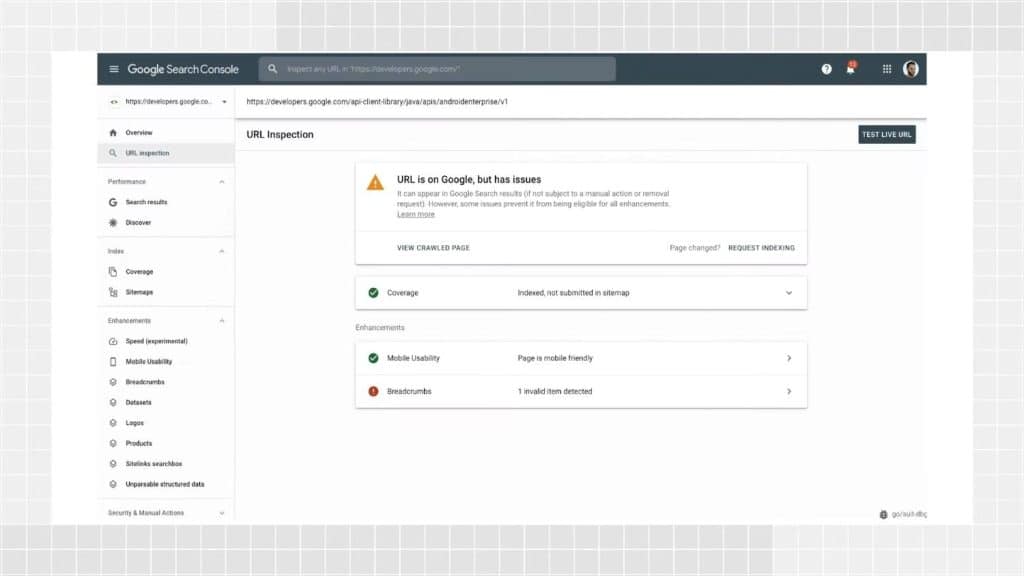
If you don’t control the site and the status is “Crawled, currently not indexed,” Contact the publisher. Share the Search Console label. Ask them to check for accidental noindex tags first; this is the most common cause on otherwise healthy sites.
Here’s a template that gets responses:
“Hey [Name], I noticed the page where my link lives may not be in Google’s index yet. It shows as ‘crawled but not indexed,’ which usually means either an accidental noindex tag or a content depth issue Google didn’t like. Would you be able to take a quick look? Happy to help troubleshoot if useful.”
This is collaborative, gives them a specific action, and avoids sounding accusatory. Response rates are meaningfully higher than a generic “your page isn’t indexed” message.
If the publisher fixes a technical issue: Ask them to run URL Inspection and click “Request Indexing” on the corrected page.
Day 30 cutoff: A page that has been crawled multiple times and consistently rejected is sending a persistent quality signal. Stop investing in this URL.
The Indexing Effort Matrix
Before spending more than 30 minutes on any unindexed link, score it here:
| Factor | Worth Effort | Not Worth Effort |
|---|---|---|
| The domain has organic traffic | Yes | Near-zero traffic |
| Page is topically relevant | Yes | Exists only to host links |
| Failure is a discovery or technical | Yes | Failure is content quality |
| Link came from editorial outreach | Yes | Directory, PBN, or template |
| The publisher is reachable | Yes | Unresponsive after two attempts |
Three or more in the right column: move on. Time spent here has a negative ROI compared to outreach for a new placement.
Third-Party Indexing Services: A Narrow Window
These services help when discovery is the only barrier and the host site is otherwise healthy. They do not help with content rejection, spam signals, or dead-domain hosts.
Use them only if all five are true: the page is on a domain with real organic traffic, the failure is purely low crawl frequency and not content rejection, you’ve confirmed no technical blockers, you’ve already tried organic amplification for 14+ days, and you’re submitting fewer than a few dozen URLs.
Volume doesn’t improve outcomes. Independent testing in 2026 found that older services produced indexing rates of only around 34% within two weeks, barely better than waiting.
Treat them as a final accelerator, not a foundation.
The Reality of Google’s Indexing API
Google officially limits the Indexing API to pages with JobPosting structured data or BroadcastEvent embedded in a VideoObject, at a default quota of 200 URLs per project per day. Many practitioners use it for general content and report faster indexing, but in May 2025, John Mueller publicly warned against this off-label use.
Gary Illyes has noted it could stop working for unsupported verticals without warning, and content sometimes drops back out of the index after a few weeks.
A job board pushing fresh listings is in the supported pattern and should use it. A general blog pushing 50 article URLs per day is risking quota throttling and eventual filtering.
A note on IndexNow: It lets you push URL changes to Bing, Yandex, Naver, and others, but Google has not adopted it as of 2026. Useful if you own the linking site and care about Bing pickup. Not a Google solution.
What We Would Actually Do: A Backlink Indexing Triage Framework
The right action depends on the link, not the tactic. Here is how to triage in practice.
Scenario 1: High-Authority Link That Isn’t Indexed
This is a case worth real effort.
- Confirm the page is not indexed using site:URL.
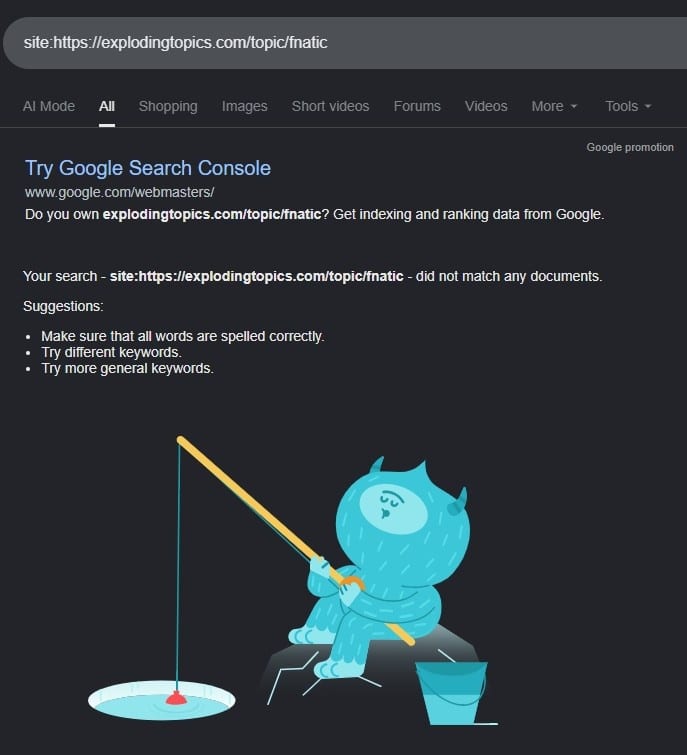
- Check for technical blockers like noindex or robots.txt rules.
- Politely ask the publisher to add an internal link from a heavily crawled section.
- Share the page through legitimate amplification channels.
- Recheck after seven days. If still not indexed, repeat amplification rather than escalating to paid tools.
Scenario 2: Mid-Tier Link With Some SEO Value
A focused, low-effort approach is right here.
- Make sure the page is in the host’s sitemap if you have any leverage.
- Mention the page in a single legitimate amplification channel, such as a topical Reddit thread or your own social profile.
- Move on. Do not spend hours on a link with a modest ceiling.
Scenario 3: Low-Quality Link That Isn’t Indexed
Often, the right move is to do nothing and focus on acquiring better links.
Run a quick check: does the domain have any organic traffic? If not, the ceiling is low regardless of indexation. Discard and move your outreach budget to a domain with real audience signals.
When Paying For Indexing Services Makes Sense
Paying makes sense in narrow cases. You own the linking site, the content is genuinely useful, the page is technically healthy, and you simply need help breaking through low crawl demand.
Even then, treat the service as an accelerator, not a fix.
Everything else is better solved at the source: fix the discovery path, improve the page, or find a better placement
Should You Disavow Links That Will Never Be Indexed?
A page that will not index passes almost nothing to you, which raises a fair question:
Should you disavow it?
For most sites, no. Google has been saying for years that its systems ignore the vast majority of low-quality links automatically, and John Mueller has repeatedly advised against routine disavow use, reserving it mainly for manual actions.
Mueller suggested in May 2024 that Google may eventually remove the disavow tool entirely, writing, “At some point, I’m sure we’ll remove it.”
Bing already retired its equivalent disavow tool in September 2023, with Fabrice Canel from Microsoft explaining the tool was no longer needed because Bing’s algorithms had improved at recognizing which links to count and which to ignore.
In December 2024, Mueller went further on Bluesky, calling disavow work driven by third-party “toxic links” reports a “billable waste of time.” This matters because disavowing healthy links by mistake can strip away value you were earning. The safer default is to leave a non-indexing link alone and reinvest in better placements.
Tools For Checking Backlink Indexation
No single tool will help you in every aspect of backlink indexation and monitoring. The following comparison highlights where each tool fits best, helping you choose the most appropriate solution for index checking, backlink analysis, competitive research, and ongoing link monitoring.
| Tool | Best For | Notes | Cost | Accuracy | Best Use Case |
|---|---|---|---|---|---|
| IndexCheckr | Bulk index monitoring | Built for large URL sets | From $15 | High | Agencies managing backlink campaigns |
| Ahrefs Backlink Checker | Backlink research | Not a Google index checker | From $129/mo | Industry-leading | Competitor analysis and link research |
| Semrush Backlink Analytics | Backlink analysis | Strong all-in-one SEO suite | From $140/mo | Very good | Teams needing SEO and backlink data |
| UltraIndexer | Backlink indexing campaigns | Focused on submissions and tracking | From $9 | Transparent reporting | Large-scale indexing campaigns |
| Index Checker (indexchecker.io) | URL index verification | Best for quick checks | From $12/mo | Claims 95%+ | Bloggers and small agencies |
How To Check Backlink Indexation Using Google’s Site Operator?
If you do not want to use a third-party tool, Google’s site: operator is the simplest verification method.
Type the following into Google search:
site:https://exampledomain.com/page-with-your-backlink/
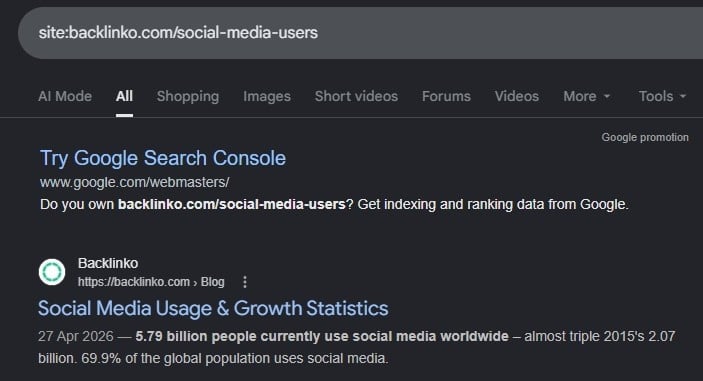
If the page appears in results, it is indexed. If it does not, it is either not indexed or temporarily filtered.
Google site operator benefits: It is free, instant, and uses Google directly. It is the closest thing to a primary-source check available to non-technical users.
Google site operator limitations: The operator can return inconsistent results, especially for newly indexed or large sites. Google has stated that a site: query “is not meant to be complete, nor used for diagnostic purposes.” It does not tell you when the page was indexed, whether it is canonical, or whether outbound links on it are being recognized.
John Mueller has recommended searching for a distinctive sentence from the page, in quotes, to confirm specific content is indexed. If that exact text surfaces, the passage is in the index. Pair the operator with a backlink tool that shows crawl history, since relying on one signal often produces false negatives.
Why it shouldn’t be your only verification method: Combine the site operator with at least one backlink tool that shows crawl dates and historical visibility. Relying on a single signal often produces false negatives.